All-in-one smart terminal
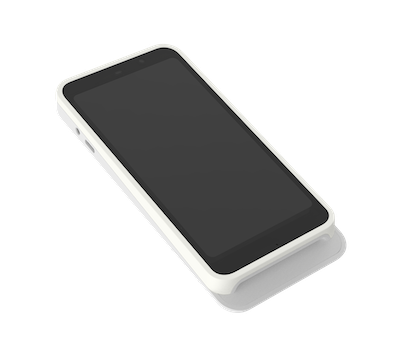
The S700 and S710 run the Payment app directly on the device—no phone or tablet required. Ideal for businesses wanting a complete standalone point-of-sale with a large touchscreen.
Video coming soon
Why Stripe Reader S700/S710
Built for your workflow
Standalone operation
Run Payment for Stripe directly on the device. No phone or tablet required—it's a complete point-of-sale system in one device.
5.5" touchscreen
Large, bright display makes it easy to process transactions, view order details, and let customers tap or insert cards.
WiFi + Cellular (S710)
The S700 connects via WiFi. Choose the S710 for built-in cellular—perfect for events, markets, or anywhere without reliable WiFi.
Compare
Find the right reader for you
Not sure which reader fits your needs? Here's a quick comparison.
The only Stripe app with full Terminal support
Unlike other Stripe mobile apps, Payment for Stripe fully integrates with Stripe Terminal hardware. Accept chip, contactless, and mobile wallet payments at Stripe's in-person rate.
Technical specifications
Available in all Stripe Terminal supported countries including US, UK, Canada, Australia, and most of Europe.
See full list on StripeAvailability may change
How it works
Get started in minutes
No complicated setup. Connect your reader and start accepting payments.
Order your S700 or S710
Purchase the reader from your Stripe Dashboard. Choose S700 for WiFi-only or S710 for WiFi + cellular.
Register the reader in Stripe
Add the reader to your Stripe account using the registration code on the device.
App installs automatically
Payment for Stripe is pre-installed or downloads automatically once registered. No setup required.
Sign in and start selling
Log into your Stripe account on the device. You're ready to accept payments—no separate phone needed.
Common questions
Do I need a phone or tablet to use the S700?
What's the difference between S700 and S710?
Can I use my existing Stripe account?
Can I set up multiple S700 devices?
Accept payments
in 60 seconds
Download the app, connect your Stripe account, and you're ready to accept your first payment. No hardware, no setup fees, no monthly costs.